We use cookies - Our website uses cookies to provide you with a better experience as well as for analytical purposes. For more information on our privacy practices and cookie policy please read our Privacy Policy.
|

Connections and Cables Guide
Video equipment such as projectors and displays feature inputs and outputs allowing you to connect sources such as computers, Blu-ray players, AV receivers etc. as well as external devices like speakers, control systems or monitors.
The quality of the image produced can vary depending on the type of connection and length of cable used so it is useful to understand the differences between the different options available.

Analogue vs Digital
Connections are split between analogue and digital types.
Without going into detailed technical definitions, the simplified definition of analogue means the data is transferred smoothly using a continuous and varying signal (imagine a curvy wave) while with digital signals, the data is encoded using a series of 0s and 1s (imagine a square wave).
The important difference between the two types when it comes to AV equipment and video signal is how they are affected by external noise and signal degradation.
With analogue connections, the more noise is introduced (poor quality cable, electrical equipment near the cables etc.), the more noise will affect the image quality (or sound for audio cables).
With digital connections, the signal can be quite robust and up to a point, external noise will not cause a degradation in the image quality. However, there is a threshold point when the digital signal falls apart resulting in total signal loss and no image or sound.
Nowadays, digital connections are preferred as they provide a reliable and high-quality image providing the correct cables are used.
VIDEO CONNECTIONS
HDMI

Rating: 5/5
HDMI is a digital connection which carries video and embedded audio data.
It is currently the most common and popular connection type for digital projectors, displays and TVs.
There are various versions of HDMI with the different versions being able to support different maximum resolutions and bandwidth. These versions relate to the HDMI used in hardware rather than the cables used to connect to the hardware.
HDMI Versions:
The latest versions available are HDMI version 1.4 and version 2.0 as well as the newer version 2.1.
- HDMI v1.4:
- Maximum transmission bit rate: 10.2Gbps
- Maximum resolution: 4K at 30Hz; 1920 x 1080 at 120Hz
- Colour format support: RGB, Y′CBCR 4:4:4, Y′CBCR 4:2:2
- Improvements on previous 1.3 version: 3D support, Ethernet and audio return channel (ARC)
- HDMI v2.0:
- Maximum transmission bit rate: 18Gbps
- Maximum resolution: 4K at 60Hz
- Colour format support: RGB, Y′CBCR 4:4:4, Y′CBCR 4:2:2, Y′CBCR 4:2:0
- Improvements on previous 1.4 version: increased 4K framerate to 60Hz, 3D at 25fps, 32 audio channel support, 21:9 aspect ratio support, Rec.2020 colour space, dual video streams and HDR
- HDMI v2.1:
- Maximum transmission bit rate: 48Gbps
- Maximum resolution: 10K at 120Hz
- Colour format support: RGB, Y′CBCR 4:4:4, Y′CBCR 4:2:2, Y′CBCR 4:2:0
- Improvements on previous 2.0 version: increased 4K framerate to 120Hz, 8K at 120Hz, scene by scene or frame by frame dynamic HDR and enhanced ARC (eARC)
When it comes to the HDMI cables themselves, there are a few types as described below:
Compatible with HDMI v1.4 specifications (and previous versions)
- Standard HDMI Cable which support resolutions 1080i and 720p
- Standard HDMI Cable with Ethernet
- High Speed HDMI Cable which support resolutions 1080p, 4K 30 Hz, 3D and deep color
- High Speed HDMI Cable with Ethernet
Compatible with HDMI v2.0 specifications (and previous versions)
- Premium High Speed HDMI Cable
- Premium High Speed HDMI Cable with Ethernet
Compatible with HDMI v2.1 specifications (and previous versions)
- Ultra High Speed HDMI Cable (48G Cable) which support resolutions 4K, 5K, 8K and 10K at 120 Hz
When choosing a HDMI cable, it is also important to understand the limits in terms of cable length depending on the quality of the cable.
- Most standard HDMI cables (Category 1 or Standard Speed) are certified for lengths up to 13m. They may still work up to 15m but may be temperamental.
- 'High Speed' HDMI cables (Category 2) with higher quality build and conductors will be fine up to 15m.
- Active HDMI cables or Optical HDMI cables are capable of transmitting the signal over greater lengths, between 20m and 50m or even up to 100m depending on the model.
Myths about HDMI cables
- Expensive HDMI cables are better
The price of a cable may be higher because of fancy packaging, brand premium and nice design however these features will not affect the quality of the image.
What matters is the cable type and construction (e.g. A wire gauge of 24 AWG is better than 28 AWG which is better than 30 AWG etc.; the better the gauge, the longer the cable can extend the signal to.). - I need a 4K HDMI cable
There is no such thing as a 4K HDMI cable. As explained above, there are a few types of HDMI cables and unless you are using a very old HDMI cable, any high speed HDMI cable will handle 4K.
If you want to make sure your cable is compatible with HDMI 2.0 then look at 18Gbps Premium HDMI cables.
VGA

Rating: 4/5
Also known as: RGB, S-VGA, 15pin D-Sub
VGA is an analogue connection used primarily to connect a computer to a projector or display. It is slowly being supplanted by HDMI but most projectors and some large displays will still include a VGA input and sometimes output.
Good quality VGA cables can support Full HD resolution and WUXGA (1920 x 1200) but they cannot support 4K.
Being an analogue signal, the image quality can be affected on very long cables especially when there are external interferences. Choose high quality cables with good shielding and ferrite cores for best results or with cables over 20m.
DisplayPort

Rating: 5/5
Also known as: DP
DisplayPort is a digital interface which was introduced in 2006 with a view to replacing VGA and DVI connections.
It is found on a few projectors but is more common on displays.
As with HDMI, there have been several versions of DisplayPort for hardware with the most recent ones being v1.4 (introduced in 2016) and v2.0 (introduced in 2019 and available in hardware late 2020).
- DisplayPort v1.4:
- Maximum transmission bit rate: 32.4Gbps
- Maximum resolution: 8K at 60Hz
- Colour format support: RGB, Y′CBCR 4:4:4, Y′CBCR 4:2:2, Y′CBCR 4:2:0, Y-only
- DisplayPort v2.0:
- Maximum transmission bit rate: 80Gbps
- Maximum resolution: 16K at 60Hz
- Colour format support: RGB, Y′CBCR 4:4:4, Y′CBCR 4:2:2, Y′CBCR 4:2:0, Y-only
- Improvements on previous 1.4 version: higher resolution support including with HDR, improved support for multiple display configurations and improved user experience with VR (virtual reality).
DisplayPort cables are not classified by version.
All DisplayPort cables are compatible with all DisplayPort hardware, regardless of the version used in the hardware or the cable certification level.
That being said, different DisplayPort cables have different transmission speed support:
- RBR cable: Certified for RBR (Reduced Bit Rate – 6.48 Gbps) transmission mode
- Standard cable: Certified for HBR (High Bit Rate – 10.80 Gbps) and HBR2 (High Bit Rate 2 – 21.60 Gbps) transmission modes
- DP8K cable: Certified for HBR3 (High Bit Rate 3 – 32.40 Gbps) and UHBR 10 (Ultra High Bit Rate 10 – 40 Gbps) transmission modes
There is no maximum length of cables specified by the DisplayPort standard however according to the DisplayPort 1.2 standard, cables up to 2m must support HBR2 and all cables of any length must at least support RBR.
For lengths longer than 20m, we would recommend fibre optic DisplayPort cables.
Myths about DisplayPort cables
- I need a DisplayPort 1.2 cable
There is no such thing as DisplayPort 1.1 or 1.2 cables. As described above, all standard DisplayPort cables will support RBR, HBR and HBR2. - It's better to buy a more expensive cable for a better picture
Buying expensive cables won't provide a better picture. Because it is a digital connection, you will either get a signal or you won't, there are no incremental improvements with more expensive cables.
That being said there are low quality cables which can cause video and audio issues or not work at all so ensure you are buying a good quality cable.
DVI

Rating: 3/5
Also known as: Digital Visual Interface, DVI-I, DVI-D, DVI-A
DVI is used to connect a source such as a computer to a display device. Unlike HDMI it only transmits video, not audio.
There are three main types of DVI: DVI-A (analogue only), DVI-I (integrated – combines digital and analogue), DVI-D (digital only).
DVI also comes in two varieties: single-link and dual-link which has additional pins to increase the bandwidth.
Single link DVI is suitable for resolutions up to 1920x1200 at 60Hz while dual link will support resolutions up to 2560 x 1600 at 60Hz.
This means that a DVI connection will be fine for Full HD or WUXGA on projectors and displays, however it will not be suitable for 4K.
DVI cables are available in various lengths, up to 25m for good quality standard DVI cables or up to 100m for fibre optic hybrid cables. If you need to extend the signal further, there are DVI boosters and extenders available.
Component

Rating: 3/5
Also known as: 3x BNC, 3x RCA, YPbPr, YCbCr
Component video is technically the name of an analogue video signal used in various interfaces but when it comes to AV equipment such as projectors or displays, component usually refers to a type of interface made up of 3x RCA (consumer) or 3x BNC (professional) connectors, typically coloured red, blue and green.
Component connectors are now rarely found on the latest AV equipment as digital interfaces are preferred.
Component can carry non-interlaced video and resolutions up to 1080i for YPbPr.
As with other analogue signals, the length of the cable and any external interference may affect the image quality so if using component, choose good quality cables.
S-Video

Rating: 2/5
Also known as: S-VHS, Y/C, mini DIN
S-video is an analogue interface that carries the video data as two separate signals, luma (brightness) and chroma (colour), unlike composite video which carries (lower-quality) picture information as a single signal, or component video which carries (higher-quality) picture information as three separate signals, typically luma and two chroma components. S-Video was mostly phased out with the arrival of high definition video.
S-Video can carry 480i or 576i resolution video (standard definition video).
Composite

Rating: 1/5
Also known as: 1x RCA, Single phono, Cinch, CVBS
Composite is an analogue video signal and is the lowest quality interface found on AV equipment nowadays.
It usually is found in the form of a single yellow RCA connector or with two (red and white) audio RCA connectors.
It carries standard definition video as a single channel, up to 576i resolution.
5-BNC

Rating: 4/5
Also known as: 5x BNC, RGBHV
5x BNC connectors are a high-end alternative to VGA interfaces. They use 5 separate signals over coaxial cable, preventing crosstalk thanks to full coaxial shielding. They are found only on the higher-end equipment used for professional video applications.
SDI

Rating: 4/5
Also known as: HD-SDI, 3G-SDI
SDI is a family of digital video interfaces which includes HD-SDI, 3G-SDI, 6G-SDI and 12G-SDI.
The various versions support different bitrates and resolutions.
- HD-SDI: 1.485 Gbps – 720p, 1080i
- 3G-SDI: 2.97 Gbps – 1080p @ 60Hz
- 6G-SDI: 6Gbps – 1080p @ 120Hz, 2160p @ 30Hz
- 12G-SDI: 12 Gbps – 2160p @ 60Hz
SDI is used for professional video applications like broadcasting and can be found on a few projectors.
Cables for SDI interfaces are one or more coaxial cables with BNC connectors like the ones used for 5x BNC although higher quality cables may be necessary for long runs at the higher bitrates.
AUDIO CONNECTIONS
Mini Jack

Also known as: 3.5mm jack, headphone jack, audio jack, phone jack
The mini jack connector is commonly found on many projectors and displays to input or output audio signal, often in conjunction with a VGA video input (HDMI carries audio on the same cable).
Being an analogue connection, it can suffer from line loss and interference which will affect the sound quality, especially over long cable runs.
2x RCA

Also known as: 2x Phono
Many projectors and displays include 2x audio RCA connectors, usually as white and red plugs, alongside or instead of a mini jack input. They are often, but not always, associated with the composite (yellow phono) video input.
Like the mini-jack cables, 2x RCA is an analogue connection and can suffer from line loss and interference.
Optical
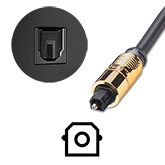
Also known as: Toslink
Optical audio is a digital interface which doesn't suffer from interferences unlike the analogue RCA and mini jack audio cables. However due to light attenuation, the lower cost plastic optical cables are limited in how long the cable can be before suffering from jitter or total signal loss. Higher quality cables allow for longer lengths.
OTHER CONNECTIONS
USB

USB is an interface used widely on many AV sources and displays for various functions.
There are several USB connectors available on electronic devices but the most commonly found on displays and projector are USB Type A (thin rectangle) and USB Type B (small square with 2 clipped corners) both version 1.0 or 2.0.
On projectors and displays, USB is often used for control and firmware updates, to connect a USB WiFi adapter, for PC-less presentation using an external USB storage device or even, on selected projector models, to display images via 3-in-1 USB display.
On interactive displays, USB is also used to allow interaction with your computer software from the screen surface.
Ethernet

Also known as: network, RJ45, Cat5/6/7
In most cases, ethernet connections are used on displays and projectors to connect the device to a local area network (LAN) to allow remote control and monitoring from a centralised office (e.g. in large office building or schools). It allows system administrators to turn on/off devices, check projector lamp usage, switch input etc.
It can also provide Internet access (if the network is connected to the Internet) for control from anywhere in the world or for Cloud content on signage displays, or simply to browse from an interactive display.
For some displays and projectors, network access allows users to display content from a remote computer.
Because Cat5/6/7 cables are better at carrying a signal over long distances, ethernet extenders are often used to convert HDMI or VGA to a network interface at the source and then convert it back to HDMI or VGA at the display side.
The newer the version of the cable, the higher resolution it can carry and/or the longer the cable can carry the signal.
HDBaseT

Although HDBaseT uses the same 8 pin connector type and cables as Ethernet, it is different from Ethernet. It uses a different protocol to transmit a signal.
HDBaseT 2.0 transmits uncompressed UHD video, up to 4K at 30Hz with 4:4:4 colour coding or 4K at 60Hz with 4:2:0 colour coding. While it is useful over longer cable lengths, HDMI 2.0 is better if you want 4K at 60Hz with 4:4:4 colour.
HDBaseT will also carry an audio signal (it doesn't support ARC), Ethernet (100 MBps), power for power over HDBaseT and control signal.
If using a projector with a HDBaseT connector, you will need a separate compatible transmitter to convert the signal from the source.
RS232

RS232 also known as serial port is used for monitoring and controlling equipment remotely.
It allows commands such as turning equipment on or off, change video source, control speaker volume or check the status of the equipment (e.g. lamp life counter).
While Ethernet is now preferred for control and monitoring, RS232 is still widely available on AV equipment.
12V Trigger
A 12V trigger input or output is usually in the form of a 3.5mm mini-jack connector and a standard 3.5mm jack cable is used to connect the trigger connectors between two devices.
A 12V trigger is used to integrate and automate equipment.
For example, to connect a projector to an electric projector screen so when the projector is turned on, a signal is sent to the screen for it to automatically come down without needing to use the projector screen's remote control separately. When the projector is turned off, the screen is then automatically retracted.
Some amplifiers/AV receivers have 12V triggers to automate more complex audio systems involving multiple devices.