We use cookies - Our website uses cookies to provide you with a better experience as well as for analytical purposes. For more information on our privacy practices and cookie policy please read our Privacy Policy.
|

Interactive Display Technologies

Interactive flat panels can be found in many classrooms, meeting rooms and public spaces with a wide range of manufacturers, sizes, technology and features.
Before choosing an interactive display model for your project, it is important to understand the differences between models and in particular the technology they use as not all interactive displays perform equally.
The way interactive displays detect touch and respond to it depends on the technology used. The most common touch technology found in current interactive screens is infrared but others include capacitive, DViT, HyPr Touch and InGlass technology.
This guide will explain the differences in how they work and what this means to your experience in using them.
INFRARED TOUCH TECHNOLOGY
Infrared, also known as IR touch technology, is currently the most widely used touch technology in commercial interactive displays. It has been in use for some years and is popular thanks to its high accuracy and lower cost compared to other technologies such as capacitive.
How does IR touch technology work?
IR touch uses an array of infrared light emitters and receivers hidden along the edges of the display. The emitters will send infrared light across the surface of the display, above the glass, to the receivers to form an invisible grid.
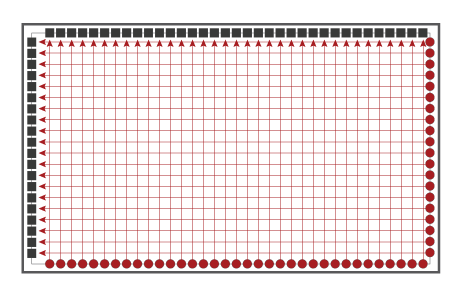
When a finger, pen or other object touches the surface of the display, the receivers will detect the interruption in the light being received. Thanks to the grid pattern, the display will then be able to determine the location of the finger, pen or object on the surface and register it as a touch point.
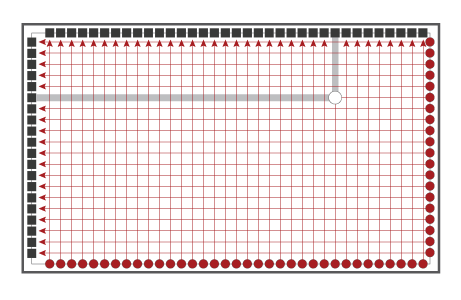
While infrared can recognise up to 40 touch point, most current IR Touch large interactive flat panels are configured to recognise up to 20 touch points, allowing several people to interact with the display simultaneously.
Advantages and Disadvantages of IR Touch technology
Advantages
- Infrared touch is a tried and tested, accurate system. It allows multiple people to interact at the same time without interference making lessons and team work truly collaborative.
- Unlike some other touch technologies, IR touch can be used on very large displays without a drop in quality. This means manufacturers can produce IR touch interactive flat panels up to 86" diagonal.
- Because IR relies on disruption of light to register a touch point, you can use a stylus, bare finger, gloved finger or any object to interact and touch will be detected.
- Compared to other technologies like capacitive, IR touch is lower in cost so interactive displays with similar features but using infrared technology tend to be lower in price.
Disadvantages
- Because infrared touch technology uses emitters and receivers along the edges of the surface, the displays require wider and deeper bezels to house them making the display look slightly bulkier than capacitive touch models.
- Sunlight can interfere with infrared touch technology so it is recommended IR touch interactive flat panels are installed away from direct sunlight to avoid issues with interactivity and tracking.
Click to browse interactive flat panels with IR technology currently available.
CAPACITIVE TOUCH TECHNOLOGY
Capacitive touch technology is also known as Projected Capacitive or PCAP. Most people are familiar with PCAP – perhaps without realising it - as it is the same technology as used in most smartphone and tablet devices.
While PCAP is common on smaller displays such as portable devices and smart appliances, it is less common on large interactive flat panels where currently it is reserved for the higher end models.
How does projected capacitive touch technology work?
PCAP uses a conductive grid between a glass protective cover and the LCD panel, to which a uniform electrostatic charge is applied. As the human body conducts electricity, touching the screen with a finger will cause a change to the grid's electromagnetic field which the display will recognise as a touch point.

Capacitive touch is highly accurate and can recognise up to 60 touch points allowing more people to interact at the same time.
Advantages and Disadvantages of Capacitive Touch technology
Advantages
- Although IR is accurate, capacitive touch is even more sensitive and accurate, can detect more touch points and has a faster response time.
- Because it doesn't use IR emitters and receivers, PCAP doesn't require a large bezel so the displays can have slimmer and sleeker designs.
- The glass cover on capacitive screens is usually highly durable and more scratch resistant to ensure it remains in good condition as it's integral to the interactive system.
Disadvantages
- Capacitive touch is more expensive than other touch technologies so interactive flat panels using PCAP are higher in price.
- Because capacitive touch uses an electrostatic charge to recognise touch points, it will only support bare fingers (or in some cases with thin surgical gloves) or styluses. Gloved fingers, especially with thicker gloves will not be detected.
- Capacitive technology has limitations and its accuracy degrades if the size of the display increases beyond a certain limit so it is not suitable for larger interactive flat panels.
Click to browse interactive displays with capacitive touch currently available.
DViT TECHNOLOGY
Digital Vision Touch, or DViT is a proprietary technology developed by SMART Technologies in 2003 as a replacement for analogue resistive technology. DViT offered a significant improvement on display brightness and contrast compared to resistive touch.
It also allowed the introduction of Object Awareness where the board or display can recognise whether a pen, a finger, an eraser or the palm of your hand is being used, and Pen ID where the display can recognise the colour of the pen being used.
As of 2020, only the SMART Board 6000 series interactive panels and SMART Interactive whiteboards use DViT technology.
How does DViT technology work?
Each DViT module includes one or more infrared light emitters (LEDs) and a camera sensor.
Interactive displays with DViT technology typically use four DViT modules, one in each corner, to detect interaction.
A reflective tape around the frame of the display ensures there is a consistent level of IR light across the surface of the display and when an object, pen or finger touches the screen, the IR light is interrupted and scattered. This scattering is seen as a bright spot by the cameras and interpreted as a touch point.
Using four cameras allows the system to determine the exact location of the touch point on the surface of the display.

Object Awareness allows the display to determine which tool is interacting with the board. This is done by measuring the difference in light intensity so the display can differentiate between a finger, a pen, an eraser or the palm of your hand. The pens supplied with the displays are made to be more reflective than fingers for example so you are able to write with a pen and then quickly use your finger for mouse control without confusing the display.
The Pen ID feature uses pens that not only reflect IR light but absorb it as well. By varying how different pens absorb and reflect IR light differently, it is possible for the DViT cameras to determine which pen is being used.
Advantages and Disadvantages of DViT technology
Advantages
- DViT allows features such as Object Awareness and Pen ID to be used, making it quicker and easier to change digital ink colour or switching between writing in digital ink and performing mouse-like actions with your finger.
Disadvantages
- DViT is limited in the number of simultaneous touch-points it can recognise. Interactive screens and whiteboards using DViT support up to 2 simultaneous touch points only which is much lower than other options such as IR, capacitive or HyPr touch.
HyPr TOUCH TECHNOLOGY
Hybrid Precision Touch technology, or HyPr Touch (pronounced "hyper") is another proprietary technology developed by SMART Technologies for some of their SMART Board interactive flat panels.
HyPr Touch combines the principles of several other technologies. Like DViT, HyPr detects reflected light for size-based object recognition, and like infrared, it uses arrays of emitters and receivers for grid-based touch detection. This allows HyPr Touch to be highly precise and differentiate between various tools and fingers.
How does HyPr touch technology work?
Unlike IR touch where emitters and receivers are on opposite sides of the display, HyPr Touch uses pairs of interleaved emitters and receivers around the whole frame.
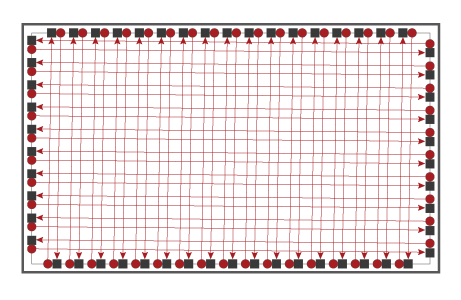
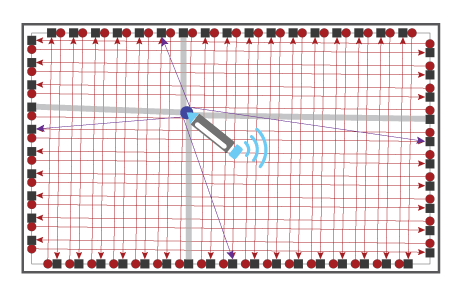
When an object or finger touches the surface, it blocks the IR light being received by some receivers (grey lines on the illustration below) and as with IR touch, the display recognises the location of the touch point thanks to the grid pattern.
With HyPr touch, at the same time as the disruption in the IR grid, the system uses reflections from the object to determine its size (purple arrows on the illustration below). Larger objects (e.g. eraser, fist or hand palm) are interpreted as an eraser while smaller objects are interpreted as a finger. When an active pen, supplied with the display, touches the screen's surface, it transmits a signal indicating it is ready and which digital ink colour to use so you can start writing and annotating in the chosen colour.
Variants of HyPr Touch
HyPr Touch is available in a few different versions with increasing levels of accuracy and improved experience.
-
HyPr Touch with Advanced IR:
Delivers twice the accuracy of traditional IR touch technology and a smoother, natural writing experience. -
HyPr Touch with InGlass:
Combines HyPr and InGlass technologies to ensure a smooth and more intuitive interactive experience with the benefits of both technologies. It ensures precision with low contact threshold so writing is free from error and artifacts. -
HyPr Touch with EMR (Electromagnetic Resonance):
The most precise writing experience providing a smooth, lag-free, pen-on-paper feel with true palm rejection and pressure sensitive inking not available on other interactive technologies.
Advantages and Disadvantages of HyPr Touch technology
Advantages
- HyPr Touch combines the benefit of several other technologies and improves on them.
- It is more accurate than IR technology but retains the ability to register a touch point from any object and even gloved fingers as well as offering multi-touch (up to 20-points as of 2020).
- It includes Object Awareness and Pen ID features as found on DViT touch technology so different objects are recognised. Switch pens to use a different digital ink colour, use the eraser to correct or remove annotation and then use your finger to open a new slide, all quickly and seamlessly.
- HyPr Touch with EMR adds palm rejection so you can rest your hand on the screen while drawing or annotation without interfering with your writing. Plus, pressure sensitive inking means you can vary the thickness of the digital ink as you write in a similar way as with real ink on paper.
Disadvantages
- HyPr Touch is a proprietary technology so it is only found on selected SMART Board displays which can be higher in price compared to standard, software free, interactive panels as they include many other features designed to provide a better experience.
Click to browse interactive displays featuring HyPr touch with Advanced IR or HyPr touch with InGlass currently available.
INGLASS TOUCH TECHNOLOGY
While not yet the most common, InGlass technology, developed by FlatFrog, is being used increasingly on interactive display due to its many advantages.
How does InGlass technology work?
Similarly, to infrared touch technology, InGlass uses an array of IR emitters and receivers around the periphery of the display to create a grid of infrared light, however this is where the similarities end.
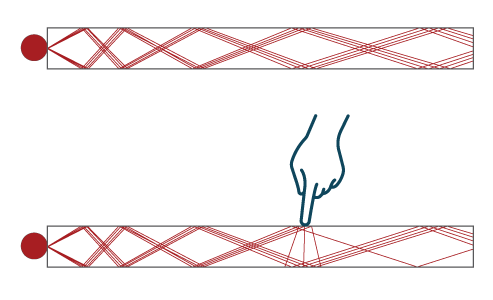
InGlass technology makes use of Frustrated Total Internal Reflection (Frustrated TIR).
The light is injected into the glass where it reflects and "bounces" internally before being extracted at the opposite side. When an object or finger touches the screen surface, internal reflections are frustrated and the light is scattered elsewhere. These disturbances are detected and a proprietary image reconstruction algorithm determines the coordinates of the touch point.
Advantages and Disadvantages of InGlass Touch technology
Advantages
- InGlass touch provides a pen-on-paper writing experience that is highly accurate, natural, intuitive and lag free. It also allows multi-touch.
- It automatically detects the difference between pen, finger or palm so there is no need to go through the on-screen menu to switch tool.
- InGlass doesn't require a thick or wide bezel so displays can be slimmer and look sleeker.
- Unlike capacitive technology, InGlass works on larger displays.
Disadvantages
- Currently InGlass is comparatively expensive compared to other technologies. While cost may lower in future as the technology is more widely used, InGlass interactive flat panels are currently higher in price than alternatives.
WHICH TOUCH TECHNOLOGY SHOULD I CHOOSE?
All the technologies described above are accurate, responsive and suitable for interactive lessons and presentations. They all allow you to interact with your software and annotate over slides etc. with ease.
There are obviously certain advantages in choosing one over the other, for example if you would like to rest your palm on the screen while writing or if you want the ease of being able to erase parts of the text by simply rubbing your hand over it rather than having to select a different tool in the on screen menu. But these enhancements come at a price so it may be dependent on your budget.
If you would like to experience the differences between technologies and features before making a choice of interactive display for your classroom, office or venue, please contact us for a demonstration.
You can also call us on 01924 278464 for further advice or a competitive quote.